Your LMS says everyone finished. So why can’t they do the job?
You have seen the report, with its green bars and every course ticked off, and yet the new starter on shift still cannot handle the first busy hour.
The gap is real. In our research with 400 frontline leaders, 72% said new hires take more than four weeks to reach full productivity, while new hires in scale-ups take 2.4 months on average.
A learning management system (LMS) cannot close that gap alone, because it was designed to deliver training and record who completed it, which the better systems do very well.
Artificial intelligence is now changing what that means. It makes learning materials faster to build, translate, assign, and grade, but it also makes completion rates easier to produce while revealing less about whether anyone is genuinely ready. The scarce resource is no longer training. It is evidence that people can perform the job.
This guide explains what an LMS does, how AI changes the picture, and how to choose a system, and it shows how to look beyond the completion record to the evidence that matters.
The short version
- An LMS delivers training and tracks completions, scores, and certifications for every learner.
- AI makes content cheaper to create and complete, but it does not make readiness any easier to see.
- Judge any LMS against one measurable outcome: ramp time, audit readiness, early turnover, or manager administration time.
- Frontline teams and scale-ups need different capabilities from the same software category.
- Knowing whether people are ready requires signals that an LMS does not hold on its own, which is where a workforce enablement system becomes valuable.
72%
of frontline leaders say new hires take more than four weeks to reach full productivity.
(Source: The frontline enablement gap)
2.4 months is the average scale-up ramp time.
(Source: The scale-up enablement gap)

Part 1: The foundation
What is a learning management system?
A learning management system (LMS) is software that delivers training, assigns it to the appropriate people, and tracks who has completed it.
Administrators add courses and assign them by role, team, or location, learners work through the material, and the system records the result.
Most organizations use an LMS for several purposes:
- Onboarding and orientation for new hires
- Compliance training for regulated or mandatory topics
- Role training and product knowledge
- Sales training for new and experienced representatives
- Leadership and skills development programs
- Customer and partner education programs
Who runs it? Usually a learning and development (L&D) team, a HR lead, an operations manager, or an enablement leader, although in smaller companies one person often performs all four roles.
The four types of LMS you will meet
LMS software comes in a few different forms, and the right one depends on who administers it and which audiences it serves.
| Type | What it is | Typically fits | Watch for |
|---|---|---|---|
| Cloud based | The vendor hosts, updates, and supports the system. | Most employers, from small teams to enterprises | Which AI and analytics features sit in your plan |
| Open source | The core code is free. You or a partner host and support it. | Teams with technical skills who want control | Hosting, support, and build costs sit outside the license |
| HR suite module | Learning built into a human capital management (HCM) system | Organizations already committed to one HR suite | You are tied to that suite’s contract and release cycle |
| Extended enterprise | Separate branded portals for customers, partners, and members | Software companies, franchises, associations | Setup effort rises with each audience |
For a shorter introduction, see What is a learning management system?
What an LMS does well
An LMS performs seven jobs, running from getting the right course to the right person through to keeping the record that an auditor will request. Understanding each job helps you see where a system is strong and where your team will be doing the work by hand.
| Capability | What it does | What to check |
|---|---|---|
| Content delivery | Plays courses, video, documents, assessments, and live sessions | Does it run on the devices your people use? |
| Assignment | Enrolls people by role, group, or location | Can rules update when someone changes role? |
| Tracking and certification | Records completions, scores, and certificates | Can you see more than “complete” and “incomplete”? |
| Compliance records | Keeps an audit trail, sets reminders, and manages expiry | Do certificates renew without an admin chasing them? |
| Reporting | Shows progress and performance by person, team, and site | Can a manager read it without a specialist? |
| Admin and integrations | Manages users, single sign-on (SSO), and HR system sync | How much admin time does a routine change cost? |
| Content creation and libraries | Builds courses and offers ready-made learning materials (varies by vendor) | Who updates a course when a policy changes? |
Each of these jobs involves delivering training and keeping records, and none covers what happens after the training ends.
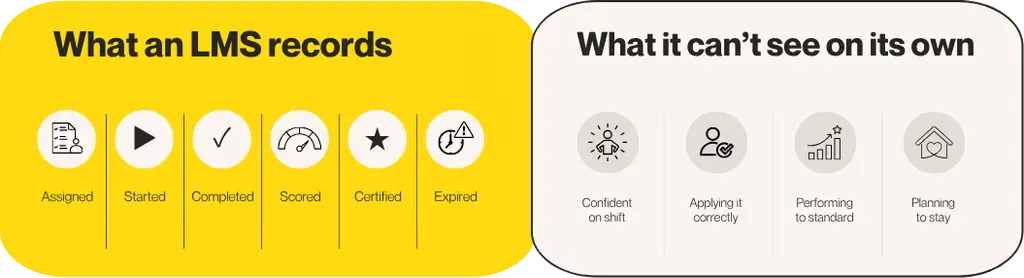
The left side holds facts about the training, while the right side holds facts about the person, and the second set is what you really want to know. A course record cannot provide it.
The proof ladder: what an LMS should prove, not just do
Finishing a course is the easiest thing to prove and, on its own, tells you the least about capability, so a good LMS should help you prove considerably more than that.
Think of training evidence as a four-step ladder. Each step answers a harder question than the one beneath it, and you need the lower steps to reach the higher ones. Standard LMS reporting covers the bottom two, whereas the top two require signals from outside the course record.
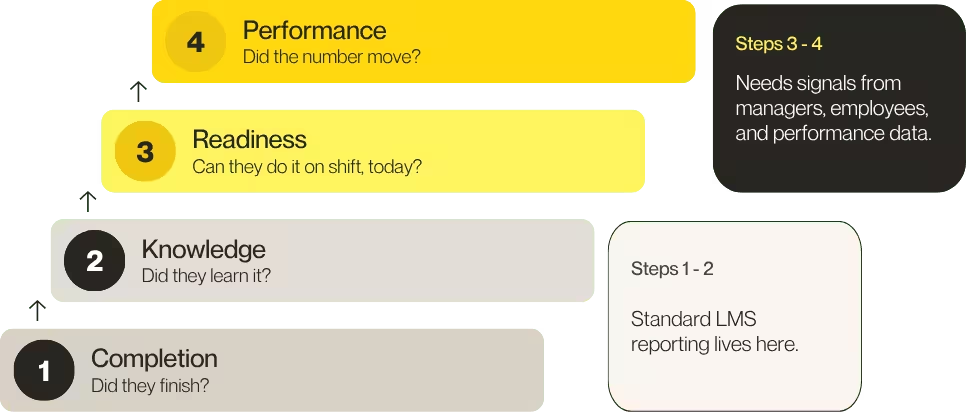
Step 1: completion
Did they finish? Every LMS can answer this question. It confirms that training happened and nothing more, so although an auditor asks for it first, it remains the weakest evidence of capability.
Step 2: knowledge
Did they learn it? Quizzes, assessments, and certifications show that someone absorbed the content on the day. A passed quiz proves recall, but it doesn’t prove the person can apply the knowledge under pressure.
Step 3: readiness
Can they do it on shift, today? This is where the course record runs out. Readiness depends on manager observation, practice, and honest confidence signals from the person doing the job, and many LMS configurations capture none of these.
Step 4: performance
Did the number move? You need this step when someone asks what the training actually delivered. It means connecting learning data to ramp time, quality, safety, or sales so you can demonstrate change instead of merely reporting activity.
An example of the climb (illustrative composite, not a customer story).
A new starter finishes onboarding, so step one says yes. They score 92% on the quiz, so step two says yes. Then the first busy shift arrives, and they hesitate on a process they supposedly know, which is exactly where step three shows up. Step four asks whether this is happening across the whole cohort, and whether ramp time is falling as a result.
Why the upper steps matter
Leaders feel confident about the upper steps, but far fewer can demonstrate that those steps are working.
98%
of frontline leaders say their performance management and engagement initiatives improve frontline performance. Only 46% say they do it very effectively.
(Source: The frontline enablement gap)

That gap has a measurable cost. Among leaders who say their performance management works very effectively, 72% report that frontline performance becomes very consistent in peak or seasonal periods, but among leaders who say it works only somewhat effectively, that figure falls to 23%.
An LMS cannot close that gap alone, because it cannot see the top two steps. It can still be where the climb starts, by making sure the first two steps are solid and ready to connect to everything above them.
For frontline teams. The biggest barriers to effective training are not about content. Leaders told us that system complexity and a lack of manager support were the top two, each cited by 46%, followed by time constraints at 42%, so you should choose a system that managers will actually open.
For scale-ups. Scale-up leaders believe strongly in enablement, and 98% say they are confident that learning and enablement drives measurable business outcomes. Step four is where you prove that belief to your board.
Part 2: The AI era
What AI changes about training
AI changes the economics of training, but it does not change what training is for.
Most AI in an LMS performs a familiar set of tasks. It drafts courses from documents, writes quiz questions, translates content, adds captions, grades free-text answers, and answers questions about your data, and each of these tasks removes work from an administrator, a trainer, or an analyst.
Completion is getting cheap. Readiness evidence is getting scarce.
A course now takes hours to draft instead of weeks, automatic translation means more of it reaches more people, and automatic grading means more of it gets marked.
That is real progress, but consider what it accelerates: steps one and two of the proof ladder. More training produces more completions and more passed quizzes, yet it does not automatically produce more people who are ready on shift.
Our research already shows this pattern. Scale-ups have adopted AI almost universally, but far fewer are getting full value from it.
100%
of scale-up leaders say their organization uses AI or technology-driven enablement tools. Only 42% say they use them very effectively.
(Source: The scale-up enablement gap)

The same research shows where the value goes missing. 87% of leaders say employees are not fully equipped to perform their roles as the organization scales, to a great or some extent, which means the tools are in place but people still are not ready.
The takeaway: as training becomes easier to produce, the question changes from “did we train them?” to “can we show they are ready?”
What AI does at each rung of the proof ladder
| Rung | What AI can do | What still needs a signal outside the course |
|---|---|---|
| 1. Completion | Draft courses from files, assign by rule, translate, caption | Nothing extra. This is the LMS’s home ground. |
| 2. Knowledge | Generate questions, grade written and video answers | Confirmation that the grading is accurate and reviewed |
| 3. Readiness | Run practice and role play, give feedback before a live moment | Manager observation and the employee’s own confidence on the job |
| 4. Performance | Answer questions about your data in plain language | Performance data connected to learning data, such as ramp time, quality, safety, or sales |
AI is strongest on the lower rungs, where the work is producing and marking content. On rung three it can help people rehearse, which is a genuine step forward, but rehearsal is not the same as being ready on shift, so manager and employee signals still matter. On rung four, AI makes the answer easier to request, yet it cannot create data that was never connected. (Review comment)
Where the LMS is heading
Four shifts matter for anyone buying or renewing an LMS now. They describe where the category is going and are not predictions of specific dates.
From course libraries to skills and readiness data. A library tells you what content exists, but the better question is what each person can do and what they need next. Systems that map training to skills, and skills to roles, give managers something to act on, while systems that only count courses do not.
From content to practice. Reading and watching are the easy part of learning, whereas practice, such as role play before a customer conversation, is harder to arrange and often requires a live coach. AI-supported practice is one way to make rehearsal available to more people, as long as someone still reviews how feedback is scored.
From the course catalog to the flow of work. People learn between tasks, on shared devices, and on the job, so short lessons and quick updates matter more than a bigger catalog. Over the long term, the learning process has to fit inside the shift instead of sitting beside it.
From activity data to evidence. SCORM records completion and score, whereas newer standards such as xAPI can record learning from many sources, including simulations and on-the-job sign-offs. If you want to reach rung three or four of the proof ladder, the data you can capture matters as much as the content you deliver.
None of these shifts is only an LMS feature, because each depends on connecting learning to what happens afterward, which is why the next section matters.
Where the LMS sits in a workforce enablement system
An LMS is one part of a much bigger picture. Workforce enablement is the practice of connecting learning, engagement, and performance so that a workforce can do its job well, and a workforce enablement system (WES) is the technology that makes this happen after people are hired.
The Talent Flywheel is Confirm’s name for that connected loop. It runs clockwise from Learn to Engage to Perform, and each stage feeds the next.
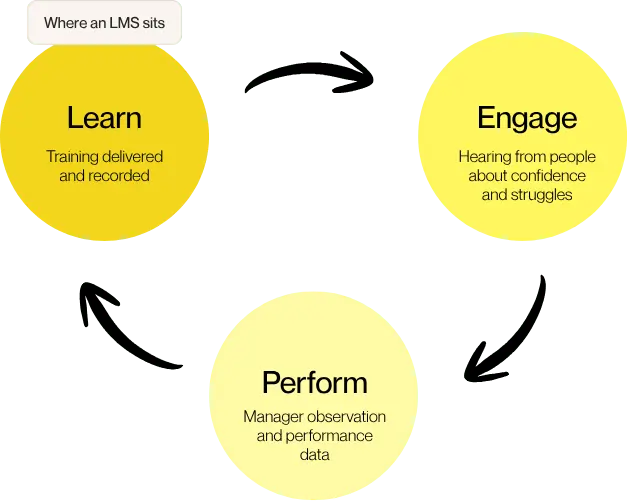
An LMS sits inside the Learn stage, so completions become one input into a wider view of readiness instead of the finish line.
A WES does not replace your applicant tracking system (ATS) or your HCM or HRIS, which hire and administer people. A WES takes over where they stop.
What signals come from where
| Proof ladder rung | The question | Where the signal comes from |
|---|---|---|
| Completion | Did they finish? | Learn: the LMS record |
| Knowledge | Did they learn it? | Learn: quizzes, assessments, certifications |
| Readiness | Can they do it on shift, today? | Engage and Perform: employee confidence signals, manager observation, practice |
| Performance | Did the number move? | Perform: ramp time, quality, safety, or sales, connected to learning data |
Learning alone leaves you with a “so what?” problem, because you know training happened but not whether it changed anything. Engagement and performance tools alone leave a “now what?” problem, because they flag an issue but cannot point to the fix. Connected together, they let you equip people, listen for where they struggle, act on what you hear, and measure what changes.
Part 3: How to choose
How to choose a learning management system: an outcome-first checklist
Most LMS demos look impressive, but the hard part is knowing which system will genuinely change something for your people.
Start with the number that must move, and then select the features that move it. Most buyer checklists work in the opposite direction, opening with features, so teams end up with 40 ticked boxes and no change on the floor.
Reverse the order. Before any demonstration, ask one question: which number has to move this year? That is step four of the proof ladder in practice.
| If the number is… | Ask for… | Watch out for |
|---|---|---|
| Ramp time | Role-based onboarding learning paths, short lessons, assessments tied to real tasks, reports by start date | Completion reports that can’t separate new hires from everyone else |
| Audit readiness | Certificate expiry, automatic re-enrollment, a clean audit trail, reports by site and role | Expiry dates tracked by hand in a spreadsheet |
| Early turnover | Learning that connects to a way of hearing from new hires | An LMS shows who is trained. It can’t show who is thinking of leaving. |
| Manager admin time | Rules-based assignment, automatic reminders, a manager view with no report pulling | Routine changes that still need a specialist |
The 10 criteria that matter
Your number tells you what to prioritize, and these ten criteria tell you how to compare systems fairly. Score every vendor against the same list so that the demonstration decides the outcome instead of the sales pitch.
| Criterion | What good looks like | Ask in the demo |
|---|---|---|
| Learner experience and devices | Works on the devices your people use | “Show me this on a shared device.” |
| Content and authoring | Admins build and update courses without a developer | “How long to turn one policy change into a live course?” |
| Compliance and audit trail | Expiry, renewal, and records handled by the system | “Show a certificate expiring and renewing.” |
| Reporting | Managers see their team’s progress and performance in a few taps | “What does a site manager see on day one?” |
| Integrations and standards | Connects to your HR system, SSO, and CRM; supports SCORM and xAPI | “Which integrations are included in my plan?” |
| AI features | Removes a named admin task or improves a learner moment | “What does it do, and who reviews it?” |
| Admin effort | A small team can run it | “How many admins do similar-sized customers tend to have?” |
| Security and accessibility | Clear controls and published evidence | “Show me your accessibility conformance statement.” |
| Implementation and support | A clear plan and named support | “What does week one look like?” |
| Total cost | Predictable over three years | “Give me an itemized three-year quote with renewal terms.” |
Not all ten criteria carry the same weight for every organization.
For frontline teams. Consider devices, shared access, and the manager view most heavily, because if your people learn between customers, lesson length and sign-in speed matter more than the number of features.
For scale-ups. Consider administration effort, integrations, and time to launch most heavily, because if one person runs everything, a system that needs a specialist will stall.
Want to compare vendors side by side? The outcome-first LMS evaluation scorecard lets you score any system against the number you need to move. It includes one tab for frontline teams, one for scale-ups, and an RFP and demonstration question bank.
AI features: what to test in a demo
AI earns its place when it removes a named task or improves a learner moment, and if a vendor cannot name either, you should keep looking.
Every LMS vendor now describes its product as AI-powered, so the label means little on its own. The useful questions concern what the AI does, for whom, and what it replaces, and seven features come up most often.
| AI feature | What it should remove or improve | Ask the vendor |
|---|---|---|
| Course creation from files | Weeks spent turning documents into training | “Who reviews the draft before it goes live?” |
| Translation and captioning | Manual rework for every language | “How is accuracy checked in each language?” |
| Features that personalize learning | One-size-fits-all lessons | “What does the learner see differently, and why?” |
| Practice and role play | Rehearsal that needs a live coach | “How is feedback scored, and by what standard?” |
| Grading | Hours of marking free-text and video answers | “Can an admin override the grade?” |
| Plain-language reporting | Waiting for an analyst to build a dashboard | “Where does the answer come from?” |
| Skills mapping | Guesswork about who needs what | “How is the skills data kept current?” |
Every row names something that a person does by hand today, so if a feature in a demonstration cannot be matched to a task like that, treat it as a label until the vendor proves otherwise.
How to test AI in a demo
A scripted demonstration will always look good, so ask the vendor to show the feature on your terms.
- Bring your own file. Ask the vendor to turn a real policy or standard operating procedure (SOP) into a draft course instead of using a prepared sample.
- Find the review step. Watch where a person checks and edits the output before any learner sees it.
- Time it against today. Compare the time it took in the demonstration with what your team currently takes.
5 questions to ask about any AI feature
- What task does it remove? A named administrative task or learner moment is the test, because “saves time” is not an answer.
- Where is the human review step? AI drafts and grades can be wrong, so someone should check and change the output before it reaches learners.
- How are language and accuracy handled? This matters most if you translate content into several languages.
- Where does learner data go? Ask where it is stored and whether it is used to train models.
- Can we switch it off? Any feature that does not fit your policies or regions should be easy to disable.
For frontline teams. Ask whether AI helps a manager act in two taps. Faster course drafting helps your L&D team, but a clearer view of who’s behind is what helps your sites.
For scale-ups. Ask whether AI gives a team of one more hours back, and look first at course drafting, grading, and translation.
LMS, LXP, LCMS, CMS, and authoring tools: how the terms differ
Learning technology uses many similar acronyms, and vendors don’t always use them the same way. These five tools sound alike but perform different jobs, so confusing them is an easy way to buy the wrong thing.
| Term | What it is | Core job | Where it stops |
|---|---|---|---|
| LMS (learning management system) | Software that delivers and tracks training | Assign, deliver, and record learning | Doesn’t show whether people can do the work |
| LXP (learning experience platform) | A layer that personalizes and curates learning content | Recommend the right content to each learner | Same blind spot as an LMS, with a better interface |
| LCMS (learning content management system) | A system for creating, storing, and reusing learning content | Manage content as reusable building blocks | Typically hands delivery and tracking to an LMS |
| CMS (content management system) | Software that publishes and manages website or document content | Publish and organize information | Has no learner tracking, certificates, or compliance records |
| Authoring tool | Software that builds courses | Turn knowledge into interactive training | Doesn’t assign, deliver, or track on its own |
Here is how the pieces fit together. An authoring tool builds the course, an LCMS may store it, an LMS delivers it and records who finished, and an LXP can then recommend it to the right learner. Most companies won’t use all of these tools together; many will simply have an LMS or LXP, often alongside an authoring tool.
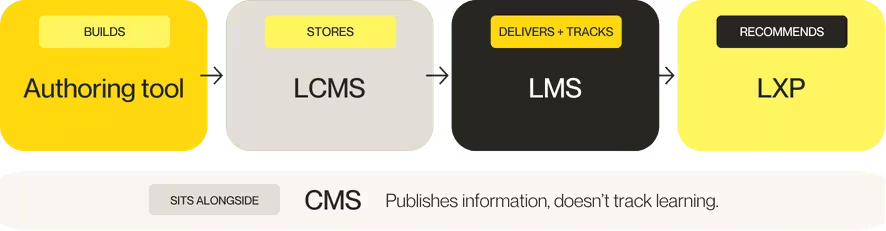
The CMS sits beside the flow because it performs a different job. It publishes information to a website or document library but cannot tell you who learned what, so it cannot provide certificates or compliance records.
Some vendors bundle two or three of these into one product, which is fine as long as you know what each one does and ask the vendor to name it.
Integrations, standards, and security
An LMS that cannot connect to your other systems becomes another silo, so check the plumbing before the paint.
Integrations to expect
- HR system. Keeps users, roles, and locations current across both systems.
- Single sign-on. Provides one login and generates fewer support tickets.
- CRM and sales tools. Matters if you run sales training or educate customers.
- Messaging and meetings. Slack, Teams, or Zoom put learning where people already work.
Ask which integrations are included in your plan and which cost extra.
The three standards worth knowing
These standards determine whether content can move between systems and how much data you can record.
| Standard | What it does | Maintained by | Reach for it when |
|---|---|---|---|
| SCORM (Sharable Content Object Reference Model) | Packages a course and tells an LMS how to play it. Reports completion and score. First released in 2001, with a major revision in 2004. | ADL (Advanced Distributed Learning Initiative) | You want content to move between LMS vendors |
| xAPI (Experience API) | Records any learning experience as a statement, like “Maria completed Module 3,” in a learning record store (LRS). Ratified as IEEE 9274.1.1-2023. | ADL and IEEE | You want to track learning outside the LMS, such as simulations or on-the-job sign-offs |
| cmi5 | An xAPI profile with SCORM-style launch and completion rules. Introduced in 2016. | ADL | You want SCORM’s structure with richer data |
SCORM is not dead, and plenty of courses still run on it, but if you want to reach rung three or four of the proof ladder, xAPI-style data matters.
Security and accessibility checks
Ask for evidence instead of reassurance.
- How do single sign-on and role-based access work in practice?
- Where is learner data stored, and who can reach it?
- How does the system handle accessibility? Ask for a conformance statement against Web Content Accessibility Guidelines (WCAG) 2.2.
- What happens to your data if you decide to leave?
Compliance: where an LMS earns its keep
If compliance records are your biggest problem, a good LMS is the right answer.
This is the home turf of the LMS: assign the course, record the result, renew the certificate, and keep the audit trail.
But the risk usually sits beyond the record. Our frontline research found that 76% of leaders say gaps in frontline performance or training often create compliance risks or operational failures, and in manufacturing 66% say this happens very often.
A completed course is not the same as a safe shift, so look for both. List which courses manage your highest audit risk, and confirm the system renews them automatically. Strong compliance training needs these capabilities:
- Automatic expiry and re-enrollment for every certificate
- A clear audit trail by person, site, and role
- Reminders that reach both the learner and the manager
- Reports that an auditor can read without help
- Content that updates quickly when a regulation changes
Part 4: Fit for your workforce
What changes for distributed, shift-based teams
On the frontline, the LMS has to fit inside the shift, because it cannot sit beside it.
A frontline employee does not have a quiet hour at a desk. They have five minutes between customers, a shared tablet in the back, or a break on their own phone, and these learning environments shape what works.
Our research shows how much that matters. 73% of frontline leaders say that getting to training or information disrupts people’s ability to do their core tasks, and for 39% that disruption always happens. Half say learning happens naturally during shifts or on the job, so your system needs to meet people there.
73%
say accessing training or information disrupts core tasks. 72% say new frontline hires take more than four weeks to reach full productivity. In manufacturing, that rises to 92%.
(Source: The frontline enablement gap)

Some teams use blended learning, which mixes live sessions with online lessons, but that approach works only if the online part fits the shift too.
Where a desk-based LMS assumption breaks
| Desk-based assumption | Frontline reality | Ask the vendor |
|---|---|---|
| Learners sit at a desk | Learning fits into gaps in a shift | “How long is your typical lesson, and can it run in five minutes?” |
| Everyone has a personal login and device | Many people share tablets or use a back-office PC | “How does sign-in work on a shared device?” |
| One manager, one team | Many sites, many managers | “Can a site manager see who is overdue without a report?” |
| One language | Teams speak several | “How quickly can we translate a lesson?” |
| Training is a project | Policies and products change constantly | “How fast can we turn an update into a live lesson?” |
Before you shortlist anything, map where your people really learn, whether that is store Wi-Fi, a back-office PC, a shared tablet, or their own phone. Then choose the system that works at each of those places, site by site.
What changes for fast-growing organizations
In a scale-up, the LMS has to launch quickly and run lean, often with a single person behind it.
Many scale-ups are buying their first LMS. Before that, training lives in Notion pages, slide decks, spreadsheets, and a large number of live sessions, which works until you hire 20 people in a quarter and every onboarding experience looks different.
2.4 months
is the average time for a new hire to reach full productivity. 49% say it takes two to three months. 13% say more than three months. Only 33% say onboarding is very consistent across teams.
(Source: The scale-up enablement gap)

Notice that 93% say onboarding is consistent, but only a third say it is very consistent, and small differences compound as the organization grows.
What an LMS should change
| Your starting point | What a good LMS changes |
|---|---|
| Notion pages and shared drives | Training is assigned, tracked, and visible |
| Live sessions run by whoever is free | Sessions are recorded, repeatable, and scheduled |
| Separate tools for onboarding, reviews, and sales training | One place for learning, with data you can connect |
| Completion tracked in a spreadsheet | Reports update themselves |
| Customer onboarding by hand | A branded, self-serve academy |
Part 5: Market, cost, and rollout
The best LMS options: 10 names to know
There is no single best LMS, only the best fit for your size, your workforce, and the outcome you need.
We chose nine of these by US search volume for LMS brand names in October 2026, and we included Confirm because we make it. They are listed alphabetically and are not ranked.
We left out systems built for higher education institutions, such as Canvas and Blackboard Learn, as well as content libraries and course marketplaces.
Everything below comes from each vendor’s published positioning and from independent review sites. Features and pricing change, so check with each vendor before you decide.
At a glance
| LMS | Best for | Known for | Watch for |
|---|---|---|---|
| 360Learning | Teams that want internal experts to build training | Collaborative academies and AI authoring | Reviewers want simpler navigation and stronger reporting |
| Absorb LMS | Mid-size and enterprise teams training several audiences | AI-powered learning paths, coaching, and authoring | Some reviewers find the learning curve steep |
| Confirm (Learn:Up and Learn:Go) | Teams that want learning connected to engagement and performance | AI-supported learning for scale-ups and mobile-first learning for frontline teams | Ask which AI features and integrations sit in your plan |
| Cornerstone Galaxy | Large, global, regulated enterprises | Audit-ready compliance and skills intelligence | Reviewers mention support; ask which modules you would run |
| Docebo | Mid-market and enterprise teams with external audiences | Extended enterprise portals and AI features | Quote-based pricing; some features cost extra |
| LearnUpon | Teams training employees, customers, and partners | Multi-portal setup and Salesforce integration | Some reviewers want deeper customization |
| Litmos (SAP Litmos) | Small and mid-size teams with straightforward needs | Quick setup and a simple interface | Analysts call its e-commerce lightweight |
| Moodle | Teams with technical skills who want control | Open source flexibility | Moodle Workplace has no public list price |
| TalentLMS | Small and mid-size businesses | Ease of use and published pricing | Reviewers find customization limited for complex needs |
| Workday Learning | Organizations already on Workday HCM | Native HR data sync | Pricing sits inside the HCM contract |
360Learning
Best for: teams that want subject matter experts to build the training.
360Learning describes itself as an AI-driven enterprise LMS built around collaborative learning academies, and it combines LMS and learning experience platform (LXP) features. The vendor reports more than 2,500 customers.
Strengths
- Internal experts author courses, so training stays close to real work.
- AI content builder helps speed up authoring.
- Reviewers praise ease of use and collaboration.
Watch for
- One Gartner Peer Insights reviewer asks for simpler navigation and better reporting.
- Another reviewer says the AI builder shows promise but needs refining.
- Content downloaded from the system isn’t easy to modify, per one reviewer.
Absorb LMS
Best for: mid-size and enterprise teams training employees, partners, and customers from one system.
Absorb calls itself an AI-powered strategic learning system, and its G2 listing cites more than 3,000 organizations. Named features include Absorb Skills, Create AI, an AI Coach, and Absorb Analyze for custom reports.
Strengths
- Reviewers praise an intuitive design.
- AI authoring and an adaptive coach.
- Supports employee, partner, and customer learning.
Watch for
- G2 reviewers describe a steep learning curve.
- Some reviewers find reporting confusing or limited.
- Ask which AI and analytics features are in your plan.
Confirm (Learn:Up and Learn:Go)
Best for: teams that want learning connected to engagement and performance, not run as a separate tool.
Confirm is a workforce enablement system that brings learning, engagement, and performance together. It offers two learning products for different workforces: Learn:Up suits scale-ups, and Learn:Go suits frontline teams.
Learn:Up (for scale-ups). Learn:Up is the learning product from Confirm for growing teams, and it supports video, interactive content, assessments, live training, and certifications.
Strengths
- AI helps administrators draft courses from uploaded files, generate questions, and automate captions and translation.
- It connects to tools that teams already use, including Salesforce, HubSpot, Gong, Slack, Zoom, Okta, and Google Workspace.
- Practice gives sales and support representatives AI role plays and coaching before they face a customer, and Academy extends training to customers and partners.
Watch for
- Ask who reviews AI-drafted courses and grades before they reach learners, and which AI features sit in your plan.
Learn:Go (for frontline teams). Learn:Go is the mobile-first learning product from Confirm for frontline and multi-site teams, and it delivers short, practical lessons on mobile, desktop, and shared devices.
Strengths
- Role-based onboarding, bite-sized lessons, compliance, automation, and analytics sit in one system.
- Managers receive a simple view of who needs attention, with nudges and clear next steps.
- Create turns SOPs and policy changes into training quickly, in any language.
Watch for
- Test lesson length and sign-in on your people’s real devices, as you would with any vendor.
Cornerstone Galaxy
Best for: large, global, regulated enterprises.
Cornerstone Galaxy brings learning, skills intelligence, performance, and talent management into one ecosystem, and Cornerstone says more than 7,000 organizations use it. Its learning product is described as built for audit-ready compliance across employees and extended audiences, and Galaxy also folds in technology from acquired products, including SkyHive, EdCast, and Grovo.
Strengths
- Strong fit for compliance-heavy, regulated organizations, per Gartner Peer Insights reviewers.
- Skills intelligence mapped to learning and talent.
- Built for enterprise scale.
Watch for
- One reviewer says support could be better.
- Another reviewer says it does everything, but not everything best.
- Because Galaxy brings acquired products together, ask which modules your contract includes.
Docebo
Best for: mid-market and enterprise teams that train employees, customers, and partners.
Docebo is an AI-powered learning system with modules for learning, skills intelligence, enterprise knowledge, and AI agents. Its extended enterprise tools run separate branded, multilingual portals, and a bundled marketplace adds more than 30,000 third-party courses.
Strengths
- Extended enterprise portals with branding and multiple languages.
- Broad AI features across authoring, search, and coaching.
- Large third-party content marketplace.
Watch for
- Pricing is quote-based, on an active-user model, with a one-year minimum.
- A reviewer notes some capabilities, such as advanced analytics, e-commerce, and integrations, cost extra.
- Docebo’s own pricing guidance targets organizations with 250 or more learners.
LearnUpon
Best for: teams that train employees, customers, and partners in separate branded portals.
LearnUpon is a cloud LMS with separate plans for employees, customer education, and associations. Capterra lists several differentiators, including multi-portal training, Salesforce integration, dynamic group rules for automatic enrollment, and learning paths for onboarding and compliance.
Strengths
- Separate branded portals for each audience.
- Reviewers cite responsive support and a user-friendly interface.
- Automatic enrollment rules save admin time.
Watch for
- Some reviewers want deeper customization.
- Some reviewers want better learning path navigation.
- Model your growth early if you mix audiences.
Litmos (SAP Litmos)
Best for: small and mid-size teams with straightforward training needs.
Talented Learning describes SAP Litmos as a pure cloud, mobile-friendly LMS built for quick self-service setup. It supports employee, extended enterprise, and nonprofit learning programs, and its compliance management is described as sufficient for most needs.
Strengths
- Simple setup and a clean interface.
- Productized integrations for SSO, support desk, virtual classroom, and more.
- Mobile-friendly design.
Watch for
- Built for straightforward needs, so complex programs may outgrow it.
- The analyst review calls its e-commerce features lightweight.
- Check how AI features compare against your list.
Moodle
Best for: teams with technical skills who want control and flexibility.
Moodle is the open source LMS, widely used in education, and Moodle Workplace is a separate commercial product aimed at corporate training. It adds compliance tracking, automated recertification, and personal development plans.
Strengths
- Open source code and a plugin directory for customizing.
- Workplace adds corporate features such as recertification and development plans.
- Offline content is available through the premium mobile app, per a partner listing.
Watch for
- Moodle Workplace has no public list price; partners sell it.
- Hosting, support, and implementation costs depend on the partner you choose.
- One review says the number of features makes the interface hard to explore.
TalentLMS
Best for: small and mid-size businesses that want a quick, low-friction setup.
TalentLMS is built by Epignosis. Capterra lists flat-rate pricing with a free version, monthly or yearly billing, and a 14-day premium trial, and reviewers also point to AI course tools.
Strengths
- Reviewers praise ease of use and navigation.
- Published, flat-rate pricing.
- Good value for smaller teams, per reviewers.
Watch for
- Some reviewers find customization limited.
- Some reviewers find advanced reporting basic for complex needs.
- Check how it scales if you grow past a few hundred learners.
Workday Learning
Best for: organizations already running Workday HCM.
Workday Learning is a module inside the Workday HCM suite, and it uses the HR data already in Workday: roles, skills, locations, and organizational structure. Learning paths update when someone’s role or location changes.
Strengths
- Native sync with HR data.
- Ties into Workday Skills Cloud for skills reporting.
- Automatic learning path updates when roles change.
Watch for
- Pricing isn’t published; it sits inside the HCM contract.
- One Gartner Peer Insights reviewer found admin work complex and unintuitive.
- Some comparison sites describe it as lighter than dedicated LMS products.
What an LMS costs: pricing models and hidden costs
LMS cost depends on how you are charged as well as how much, so compare total cost over three years.
Vendors price in different ways, and the same headline number can mean very different bills.
| Pricing model | How it works | Where you will see it | Watch for |
|---|---|---|---|
| Active-user | You pay for people who log in during a period | Docebo describes monthly, yearly, and registered active user options | Seasonal peaks can spike the count |
| Flat-rate tiers | Set price bands by plan | TalentLMS publishes tiers, including a free version | Features differ by tier |
| Plan by use case | Separate plans for employees, customer education, or associations | LearnUpon | Pick the plan that matches your audiences |
| Partner-sold | A certified partner sells and supports the product | Moodle Workplace | Hosting and implementation vary by partner |
| Bundled in a suite | Learning sits inside a larger HR contract | Workday Learning | The learning cost is hard to separate |
The costs that hide outside the license
- Content. Ready-made courses and authoring tools may cost extra.
- Add-ons. Analytics, integrations, and e-commerce can sit in higher pricing tiers.
- Implementation and migration. Moving existing content takes real hours.
- Administration time. A system that needs a specialist effectively costs a salary.
- Renewals. Ask for renewal caps in writing.
Ask every vendor for an itemized three-year quote, and compare those figures instead of the year-one price.
Buying, implementing, and migrating to a new LMS
Plan implementation as a phased project with a named owner instead of a single launch day. Most rollouts that stall do so after go-live, when nobody owns adoption, managers never open the system, and the old one quietly sticks around. Strong training programs treat the rollout as ongoing work, and the same is true of the wider learning programs around it.
| Phase | What happens | Watch for |
|---|---|---|
| 1. Define the outcome | Agree the one number to move and how you will measure it | A goal nobody can measure |
| 2. Audit your content | Decide what to keep, rewrite, or retire | Moving old content you don’t need |
| 3. Pilot | Launch with one site, team, or cohort | Skipping straight to everyone |
| 4. Equip managers | Show managers what they will see and do | Managers who learn about it from the launch email |
| 5. Launch and support | Roll out in waves with clear help | No named owner for questions |
| 6. Measure and adjust | Check your number against the baseline | Tracking activity instead of outcome |
For frontline. Run the pilot at the hardest site, not the easiest, because if it works on a busy shift with a shared device, it will work elsewhere.
For scale-ups. Standardize training as you move. Only a third of scale-ups call their onboarding very consistent, and a new system is your chance to fix that.
If you are switching systems
Switching raises three fears: disrupted workflows, low adoption, and lost reporting history. All three are fair concerns.
Ask each vendor how they handle content migration, how long parallel running lasts, and how your history comes across, and time the move away from a compliance deadline or a seasonal peak.
Part 6: Decide and act
Keep, upgrade, or move to a workforce enablement system
An LMS tells you that training happened, whereas a workforce enablement system tells you whether it worked.
An LMS is the right choice when course delivery and compliance tracking are the whole problem, and for many teams that is a perfectly good answer. But if your questions sit higher up the proof ladder, completions will not answer them.
What your LMS can and can’t answer
| Your LMS can answer | Your LMS can’t answer on its own |
|---|---|
| Who finished the course? | Is this person confident on shift? |
| What did they score? | Did the training change how they work? |
| Whose certificate expires next month? | Which site is quietly falling behind, and why? |
| Which courses are most used? | Who is thinking about leaving? |
| How long did onboarding take? | What should this manager do next? |

| Keep your LMS if… | Upgrade your LMS if… | Move to a WES if… |
|---|---|---|
| Delivery and compliance tracking is the whole problem | Your current system is slow, hard to run, or missing basics like AI authoring | You need learning, engagement, and performance to work as one |
| It works, and people use it | Admins spend too long on routine tasks | Managers can’t see who is ready without three separate reports |
| You don’t need to connect it to other signals | You are outgrowing its integrations | You keep asking “so what?” and “now what?” after the report |
Start with learning, then add the rest
You do not have to switch everything on at once. Learning is usually the natural first step, and it is often the tool you are replacing anyway.
For frontline teams, the path runs from Learn:Go to Engage to Perform, while for scale-ups it runs from Learn:Up to Perform to Practice.
If you start with learning inside a WES, the foundations for the other two are already in place, whereas buying a standalone LMS means that adding them later requires another vendor and another integration.
Check your readiness gap: a self-assessment
| Drafting note Questions only, no scoring. We can decide later whether to gate it or turn it into an interactive tool. |
Answer each question for your own organization, and note whether you can answer it with data today, only with a guess, or not at all.
Completion
- Can you see who has finished required training, by person, team, and site?
- Do certificates renew without an admin chasing them?
Knowledge
- Can you tell who passed an assessment, and not only who completed a course?
- Does someone review AI-drafted content and AI-graded answers before they affect a learner?
Readiness
- Can a manager see who is ready to work independently without pulling multiple reports?
- Do you capture how confident people feel about their job, and act on it?
- Does anyone observe or practice the skills that matter before a live shift or customer conversation?
Performance
- Can you connect learning data to ramp time, quality, safety, or sales?
- Can you tell which sites or teams are falling behind, and why?
If most of your “not at all” answers sit under readiness and performance, that is the gap an LMS alone does not close.
Getting started
The best first step is a single question: which number has to move this year?
Write it down and score the systems you are considering against it, and then check what each one can see and what it cannot.
If your answer sits at rung three or four of the proof ladder, we should talk. We will look at your business, your goals, and whether we are the right fit.
Ready to prove learning’s impact on the numbers that matter?

Glossary
| Term | What it means |
|---|---|
| LMS (learning management system) | Software that delivers training and tracks who completed it |
| LXP (learning experience platform) | A tool that personalizes and curates learning content |
| LCMS (learning content management system) | A system for creating, storing, and reusing learning content |
| CMS (content management system) | Software that publishes and manages website or document content |
| Authoring tool | Software that builds interactive courses |
| SCORM (Sharable Content Object Reference Model) | A standard for packaging courses so an LMS can play and track them |
| xAPI (Experience API) | A standard for recording learning experiences from any source as statements |
| cmi5 | An xAPI profile that adds SCORM-style launch and completion rules |
| LRS (learning record store) | A database that holds xAPI learning statements |
| SSO (single sign-on) | One login that works across systems |
| HCM (human capital management) and HRIS (human resources information system) | Systems that administer employees: records, payroll, benefits |
| ATS (applicant tracking system) | A system that manages hiring |
| Proof ladder | A four-step view of training evidence: completion, knowledge, readiness, performance |
| Readiness | Whether a person can do the job on shift, today |
| Workforce enablement | The practice of connecting learning, engagement, and performance so a workforce can do its job well |
| WES (workforce enablement system) | The technology that makes that connection possible at scale |
| Talent Flywheel | Confirm’s name for the connected loop of learning, engagement, and performance |
FAQ
What is a learning management system used for?
An LMS delivers training, assigns it to the right people, and tracks completions, scores, and certifications. Teams use it for onboarding, compliance training, role training, skills development, and sometimes customer and partner education.
How is AI changing the LMS?
AI now drafts courses from files, generates questions, translates, adds captions, and grades answers. It also answers questions about reporting data. It makes training cheaper to build and complete. It doesn’t show whether people are ready to do the job. That needs signals from managers, employees, and performance data.
What is the difference between completion and readiness?
Completion shows someone finished a course. Readiness shows whether they can do the work on shift, today. An LMS records completion reliably. Readiness also needs manager observation, practice, and confidence signals from the person doing the job.
What is the difference between an LMS and an LXP?
An LMS delivers and tracks training. A learning experience platform (LXP) personalizes and curates learning content for each learner. An LXP improves the learner experience. But it shares an LMS’s blind spot: neither shows whether training changed how people work.
What is SCORM, and do I need an LMS that supports it?
SCORM is a standard that packages a course so any compatible LMS can play it and report completion and score. If you want to reuse content across systems, or buy courses from third parties, you want SCORM support. For richer data, also look for xAPI.
How much does an LMS cost?
It depends on the pricing model, the number of users, and the add-ons. Vendors charge per active user, by flat-rate tier, by plan, through partners, or inside a larger HR suite. Many don’t publish prices. Ask for an itemized three-year quote with renewal terms.
What should I look for when choosing an LMS?
Start with the outcome you need to move: ramp time, audit readiness, early turnover, or manager admin time. Then score each system on learner experience and devices, content and authoring, compliance, reporting, integrations, AI, admin effort, security, support, and total cost.
What is the difference between an LMS and a workforce enablement system?
An LMS delivers training and records completion. A workforce enablement system connects learning, engagement, and performance. You can then see whether training made people ready and what to do next. An LMS can sit inside a WES.
Is Confirm an LMS?
No. Confirm is a workforce enablement system. It includes learning delivery through Learn:Go for frontline teams and Learn:Up for scale-ups, alongside engagement and performance.
Related reading
- What is a learning management system?
- LXP vs LMS: what are the key differences?
- LMS vs. CMS: what are the differences?
- 9 must-have LMS modules
- 10 questions to ask before you buy an LMS
- LMS cost guide
- The complete guide to migrating training content to a new LMS
- 13 LMS best practices for successful implementation
- Frontline enablement gap report
- Scale-up enablement gap report
- The Complete Guide to Workforce Enablement
- The 12 best workforce enablement systems and platforms in 2026